
Wood Designer forum
applying two size units to one project |Page 2|Forum|WOOD DESIGNER

 Home
Home


October 4, 2012
 Offline

Hi John,
To get rid of a panel just select it and set it’s material to “nil”:
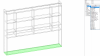

Not sure what you mean by getting rid of shelves and your TV unit.
Can you send a drawing of what you want to achieve?
To get another panel thickness just create a new panel in the library .
Go to Libraries>Panels materials and click the “New” button:
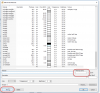
Fill in the appropriate fields and put 26 as the thickness.
Then select the panel you want to change and in the ‘materials” properties choose the new panel in the list.
All the best,
Ness

November 20, 2016
Offline
Hi there how do i change the size of the material to a size i need i.e you have one in library for either 30 mm thick or 19 mm thick however i would like 26 mm. can i do this?
November 20, 2016
Offline
ok so i have shared my projects so far below,,
how can get rid of the bottom panel of the tops cabinet and also the first row of shelves i would like to make the two outside boxes slightly deeper in height as this will be surrounding a wall mounted TV in center
November 20, 2016
Offline
ohhhh ok thanks 

November 8, 2013
Offline
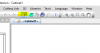
Hi John, you can click the Properties View button to make the Properties dialogue box appear/disappear:
November 20, 2016
Offline
thanks again,,
i have lost the box on the side where you can amend and change the sizes of box, material etc how do i get this back sorry this is new to me
john
October 4, 2012
Offline

Hi John,
To assemble units in a project just set the project view to isometric and clip the units together.
Making a TV unit is very simple see this video:
Once made just add it to the project like a cabinet.
All the best,
Ness
November 20, 2016
Offline
it wont let me upload the diagram,,, so i have already made two separate cabinets how to i assemble them in project mode?
November 20, 2016
Offline
Thanks for this i will send a diagram of the drawing i am trying to achieve, also are we able to add say a tv for display purposes??
thanks again 
October 4, 2012
Offline
Hi John,
You can either make 2 cabinets and assemble them in Project mode
Or use inner tooling to cut the sides :
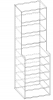
For us to advise you as to the best method for your project, can you post a drawing of photo of what you are trying to build?
best regards,
Ness


1 Guest(s)
