Customizing face frames and saving to methods |Forum|WOOD DESIGNER

Avatar
Search
Forum Scope


Match


Forum Options


Minimum search word length is 3 characters - maximum search word length is 84 characters
sp_Feed sp_TopicIcon
Customizing face frames and saving to methods
Avatar
Ness
Member
Guests
Forum Posts: 1939
Member Since:
October 4, 2012
sp_UserOfflineSmall Offline
42
April 15, 2019 - 12:41 pm
sp_Permalink sp_Print

Hi Nigel,

Here’s a little video:

Hope this is helpful,

Ness

Avatar
Guest
Guest
Guests
41
April 14, 2019 - 6:46 pm
sp_Permalink sp_Print

Ness

I’m still not getting it, could you do a step by step to how you got to the face frame and door so I can follow it.

Thanks 

Nige

Avatar
Ness
Member
Guests
Forum Posts: 1939
Member Since:
October 4, 2012
sp_UserOfflineSmall Offline
40
April 9, 2019 - 7:38 am
sp_Permalink sp_Print

HI Nigel,

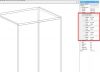
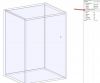
In the Properties menu, click the “+” External Zones:
external-zones-010.jpgImage Enlarger

external-zones-020.jpgImage Enlarger

Note that you can set these as included in the cabinet dimensions (inner) or outside ie. added to the cabinet dims (outer).

cheers,

Ness

sp_PlupAttachments Attachments
Avatar
Guest
Guest
Guests
39
April 8, 2019 - 11:15 am
sp_Permalink sp_Print

Ness 

How do I create that external zone to start with!!!!!!!!!!

Thanks 

Nige

Avatar
Ness
Member
Guests
Forum Posts: 1939
Member Since:
October 4, 2012
sp_UserOfflineSmall Offline
38
April 8, 2019 - 10:50 am
sp_Permalink sp_Print

Hi Nigel,

You have to create the external zones and add double backs at 0 from the front.

Then set the double backs overpassing to the carcass panels.

Over lapping values can be set to make the frame sit correctly on the carcass, but it will be necessary to adjust manually the door and drawer slacks as well as the rail lengths. If you can set up some standard configurations all this can be automated using sub-methods.

I attach an example.

Hope this helps,

Cheers,

Ness

Avatar
Guest
Guest
Guests
37
April 8, 2019 - 10:17 am
sp_Permalink sp_Print

Hi Ness

This didn’t take long, I’m confused how do I get the face frame and doors on the front? do I still have to use the double back method?

Thanks 

Nige

Avatar
Ness
Member
Guests
Forum Posts: 1939
Member Since:
October 4, 2012
sp_UserOfflineSmall Offline
36
April 8, 2019 - 9:34 am
sp_Permalink sp_Print

Hi Nigel,

Can you send me you TeamViewer id and password?

Cheers,

Ness

Avatar
Guest
Guest
Guests
35
April 8, 2019 - 9:15 am
sp_Permalink sp_Print

Ness

What do you need from me to connect?

Nige

Avatar
Guest
Guest
Guests
34
April 8, 2019 - 7:35 am
sp_Permalink sp_Print

Morning Ness

9.30 would be good 

Thanks 

Nige

Avatar
Ness
Member
Guests
Forum Posts: 1939
Member Since:
October 4, 2012
sp_UserOfflineSmall Offline
33
April 8, 2019 - 5:04 am
sp_Permalink sp_Print

Hi Nigel,

No problem, what time would be convenient for you?

Cheers,

Ness 

Forum Timezone: Europe/London
Most Users Ever Online: 1258
Currently Online:
Guest(s) 38
Currently Browsing this Page:
1 Guest(s)
Top Posters:
Ness: 1939
brendan kavanagh: 227
Emmanuel Sacco: 196
Zaheer Abbas: 177
Tom Cleaver: 166
mark nichols: 165
Conor Devoy: 160
Tom Jackson: 135
Duayne Naugle: 130
Patrick Maylor: 120
Newest Members:
polyjohn
Maxime Marengere
everslyjoinery
Indrek Raudkar
steven mason
Muebles Suecia Ltda
tmlwoodworksllc
Łukasz Reich
Lasse Finsrud Mjelva
Forum Stats:
Groups: 2
Forums: 7
Topics: 2903
Posts: 15521


Member Stats:
Guest Posters: 4
Members: 539
Moderators: 0
Admins: 11
Administrators: Stefan, Michel, Carole, Alex, Guest, Laly, Ian, Crystal, Fatima, Darren, Isaac