
Help with a few things|Forum|WOOD DESIGNER

Avatar
Search
Forum Scope


Match


Forum Options


Minimum search word length is 3 characters - maximum search word length is 84 characters
sp_Feed sp_TopicIcon
Help with a few things
Avatar
Guest
Guest
Guests
65
August 25, 2014 - 5:10 pm
sp_Permalink sp_Print

Hi Ness,


Yes all good thanks. Just need to sort the grain on a couple of panels thats all. Will post all the jobs from start to finish when compleated in october.

Avatar
Ness
Member
Guests
Forum Posts: 1939
Member Since:
October 4, 2012
sp_UserOfflineSmall Offline
64
August 25, 2014 - 4:48 pm
sp_Permalink sp_Print sp_EditHistory

Hi Jim,
it’s good to know that it’s all working now.
Are the cutting lists okay for you?
All the best,
Ness

Avatar
Guest
Guest
Guests
63
August 25, 2014 - 7:56 am
sp_Permalink sp_Print

Hi Ness, I have now got the latest version and its fine! must have been something odd in the old version…Thanks!

Avatar
Ness
Member
Guests
Forum Posts: 1939
Member Since:
October 4, 2012
sp_UserOfflineSmall Offline
62
August 24, 2014 - 8:37 pm
sp_Permalink sp_Print

Hi Jim,

Have you installed the latest version 5.12b?

If not can you download it and try again?

All the best,

Ness

Avatar
Guest
Guest
Guests
61
August 24, 2014 - 7:53 pm
sp_Permalink sp_Print

Hi ness no its just that panel in that project. A bug of some kind maybe?

Avatar
Ness
Member
Guests
Forum Posts: 1939
Member Since:
October 4, 2012
sp_UserOfflineSmall Offline
60
August 24, 2014 - 6:40 pm
sp_Permalink sp_Print

Hi Jim,

I loaded your project and had no problem with the nil panel.

Does this happen when you change other panels in other projects to nil?

ness

Avatar
Guest
Guest
Guests
59
August 24, 2014 - 6:15 pm
sp_Permalink sp_Print

Hi Ness thats exactly what i did but nill panel was not on that list. its normally at the top but wasnt….

Avatar
Ness
Member
Guests
Forum Posts: 1939
Member Since:
October 4, 2012
sp_UserOfflineSmall Offline
58
August 24, 2014 - 2:14 pm
sp_Permalink sp_Print sp_EditHistory

Hello Jim,

I’ve attached a zip file again to this post. Not sure why it didn’t show up in the other one.

To change the material on a drawer front, click on the set of drawers (multiple drawer, even if there’s only one) and then when it is selected, you should see the different individual drawers  in the properties menu.
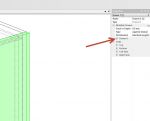
select-drawer-fronts-01.jpgImage Enlarger

Click the + sign on the drawer you want to edit to open that individual drawer parameters.
This should give you access to the materials for the drawer front.
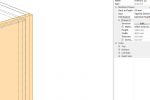
select-drawer-fronts-02.jpgImage Enlarger


All the best,

Ness

Avatar
Guest
Guest
Guests
57
August 24, 2014 - 12:46 pm
sp_Permalink sp_Print

Also I dont have nil panel as an option on the drawer front, I can use nil panel on any of the other parts of the drawer but not the front as its not on the drop down list for some reason?!

Avatar
Guest
Guest
Guests
56
August 24, 2014 - 12:38 pm
sp_Permalink sp_Print

Hi Ness, not sure if it’s me but i cant see a file attached?

Forum Timezone: Europe/London
Most Users Ever Online: 1068
Currently Online:
Guest(s) 61
Currently Browsing this Page:
1 Guest(s)
Top Posters:
Ness: 1939
brendan kavanagh: 209
Tom Cleaver: 166
mark nichols: 165
Conor Devoy: 160
Zaheer Abbas: 156
Duayne Naugle: 130
Patrick Maylor: 114
Tom Jackson: 113
Emmanuel Sacco: 108
Newest Members:
Razvan Gusul
Cristian mihoreanu
Jurij Avizen
H
magnus rehn
Stephanie Olaverry
Gustavo Muñoz
Razvan Gusul
Maciej Jaworski
Eleanor Maple
Forum Stats:
Groups: 2
Forums: 7
Topics: 2755
Posts: 14753


Member Stats:
Guest Posters: 4
Members: 477
Moderators: 0
Admins: 11
Administrators: Stefan, Michel, Carole, Alex, Guest, Laly, Ian, Crystal, Fatima, Darren, Isaac