
Wood Designer forum
Shapes getting scrambled|Page 2|Forum|WOOD DESIGNER
 Home
Home


October 4, 2012
 Offline

Hi Joss,
I’m not 100% sure but this looks like parts are requiring double sided machining.
If you use an Optinest pp export you export the parts as one 3D file and the machining on the 2 faces can get mixed up.
To check I’ll need to see your Polyboard file. Can upload it?
When parts require doubled sided machining it’s best to use an DXF pp export and set it to exporting 1 file per face:
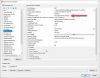

Then sort the dxf files and put one of the faces into a separate folder.
Import manually into optinest the remaining faces and run the optimisation.
Put the parts with a second face machining back on the machine and run the second face file.
Hope this is helpful.
Best regards,
Ness

Hello,
To solve one issue (Grain Matching) we were given access to the Beta version of the Polyboard (7.03n). This fixed the grain matching issue but has now opened up another issue.
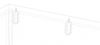
We have a set of shapes set up to allow us to cut out (rather than drill) shapes for a Lamelo Cabineos. These look fine in Polyboard (see cabineo image)
When we come to export this to either Optinest or just to DXF some of these shapes are being scrambled. (see optinest image). They are correct on the right of the image but scrambled on the left, dispite looking fine in polyboard.
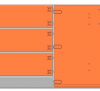
This is not happening to all of them. At a guess it would be the ones that have been permuted but I dont know. This is not just happening on this file but all files like this. I have attached one of the units that we need to export (drawers) that has the Cabineos on it.
I tried to install the latest stable version of Polyboard (7.02c) but it will not let me as it says a later version is already installed. I have tried updating the to latest Beta version and still getting the same issue. We are a bit trapped and have a machine doing nothing and a workshop waiting for pieces all because we paid to upgrade Optinest to the PLB version for grain matching.
We are now using 7.03p for Polyboard and 2.31e for Optinest.


1 Guest(s)
